Toilet Keeper

Keep Your Toilet Clean and Keep Your Partner Happy
This is an alert system to keep your toilet clean and keep your partner happy. (If he/she doesn't like your way of using toilet. lol) With this system, if you leave bathroom without closing the toilet lid, the unique alert system and a desktop notification let you know you forget to close the lid.
Check the demonstration on YouTube.
https://youtu.be/lbmWat5kvqQ
See my DEV post about this system.
https://dev.to/shun_exe/toilet-keeper-keep-your-toilet-clean-and-keep-your-partner-happy-19ih
Why I built this system
Have you ever been told to close the toilet lid?
Yes, I have.
Now I am living with my girlfriend, and she often told me to close the toilet lid after I use bathroom.
She says closing it is good for keeping the toilet clean and having less chances to drop something into toilet.
I agreed with her but could not make a habit of closing the lid every time I use bathroom. At that time, I happened to use Azure IoT Hub at work and find this azure hackathon on DEV.to.
I felt like I could build something to break my bad habit and decided to join the hackathon!
I hope this system will help somebody who has the same habit and a partner who doesn't like it. lol
Happy Hacking!
System Overview
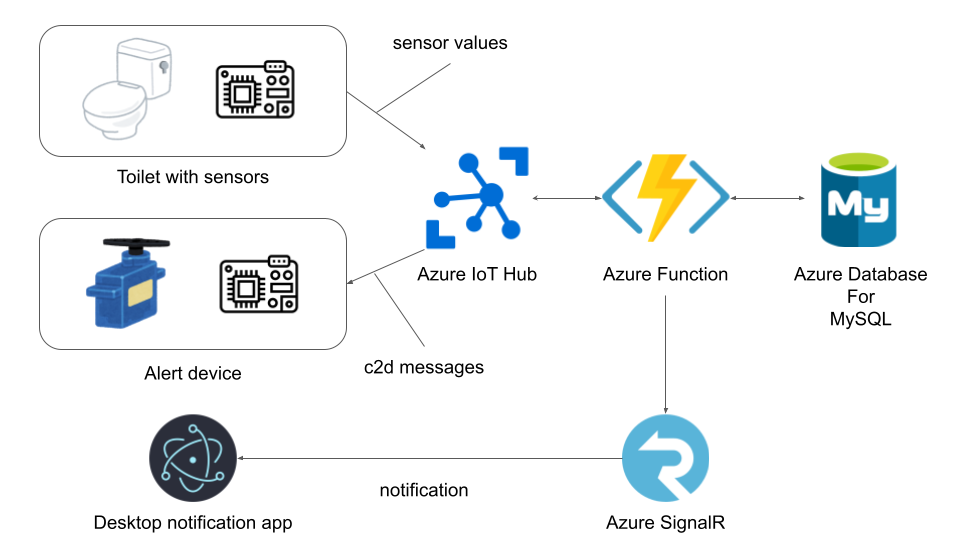
How it works
When the alert device receives messages
There are 2 timings when the alert device receives messages from the cloud.
- When you leave bathroom without closing the toilet lid
- When you close the toilet lid
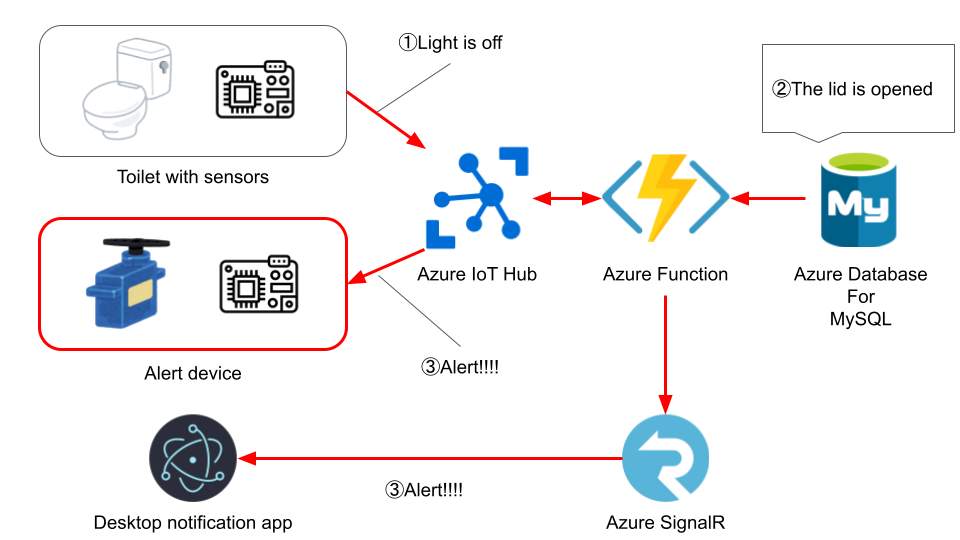
1. When you leave bathroom without closing the toilet lid
When you leave bathroom, the light sensor sends "off" to the function.
If the latest flex sensor data shows "The lid is opened", the function tells Alert device and Desktop app to activate the alert system.
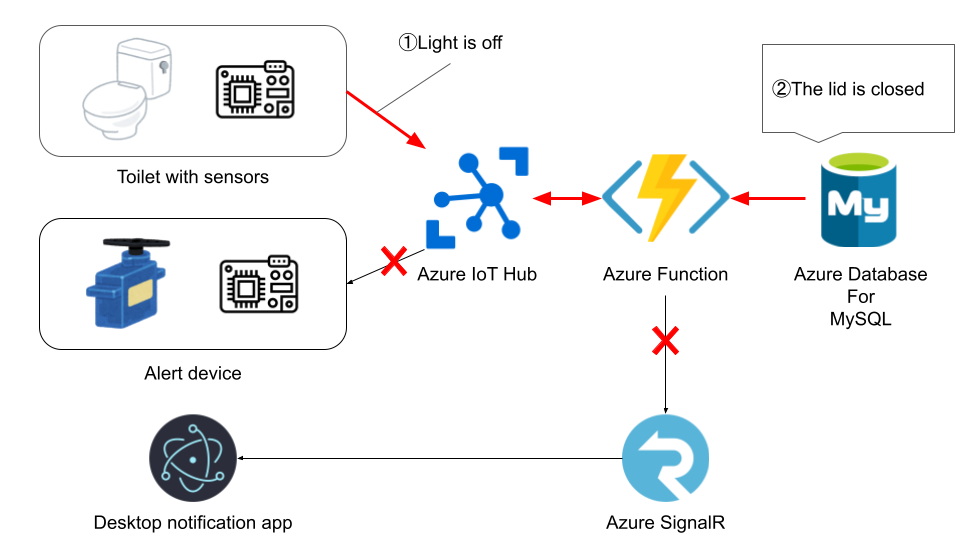
What if the latest flex sensor data shows "The lid is closed"?
That is the ideal state and the function sends nothing.
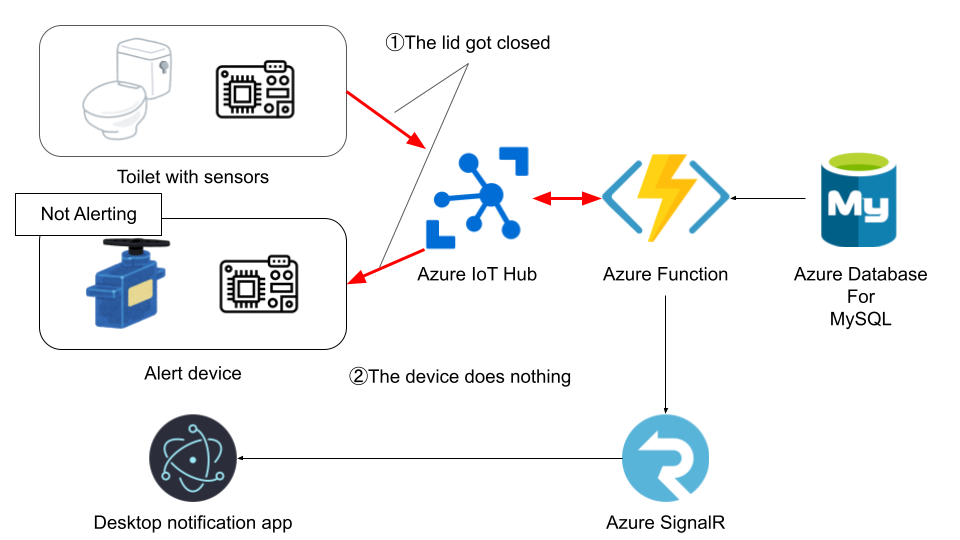
2. When you close the toilet lid
The function always sends a message to the alert device but never to the desktop app since the desktop app is stateless and nothing needs to be changed when the lid gets closed.
If the alert device is already alerting, the alert will be canceled.
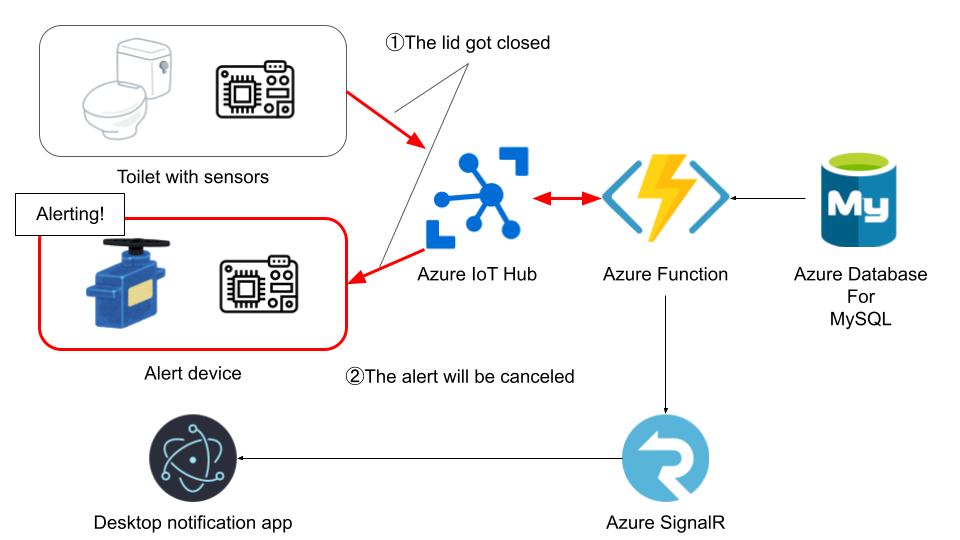
If the alert device is not alerting, it does nothing.
When sensor values are sent
Sensor values are sent when the state of each sensor changes.
- Flex sensor
- not being bended → bended
- bended → not being bended
- Light sensor
- off → on
- on → off
What you need to build your own system
Azure Resources
- Azure IoT Hub
- Azure Functions
- A Function to persist telemetries from IoT Hub and send messages to devices
- A SignalR negotiator function
- Azure Database for MySQL
- SignalR
Devices
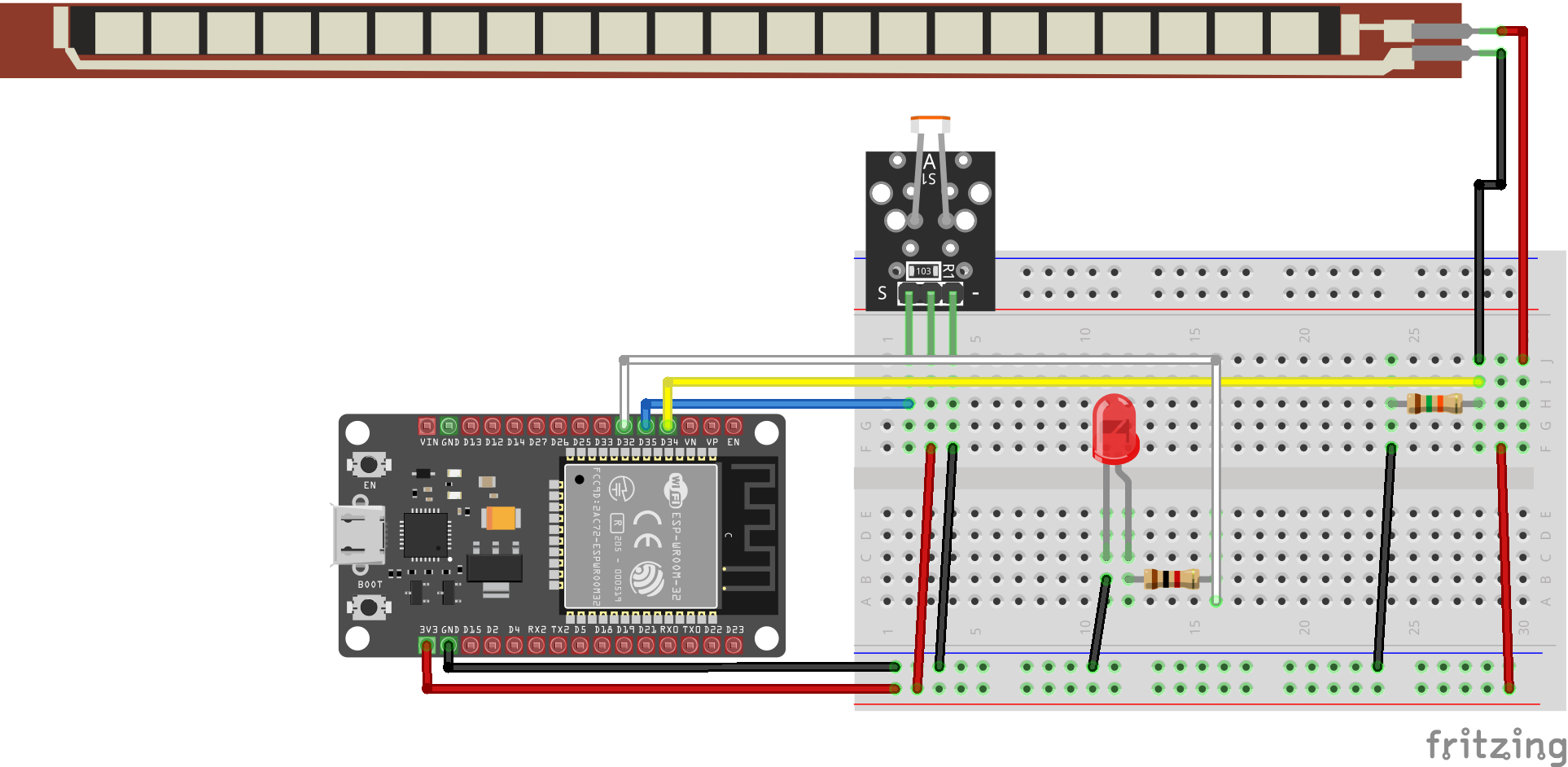
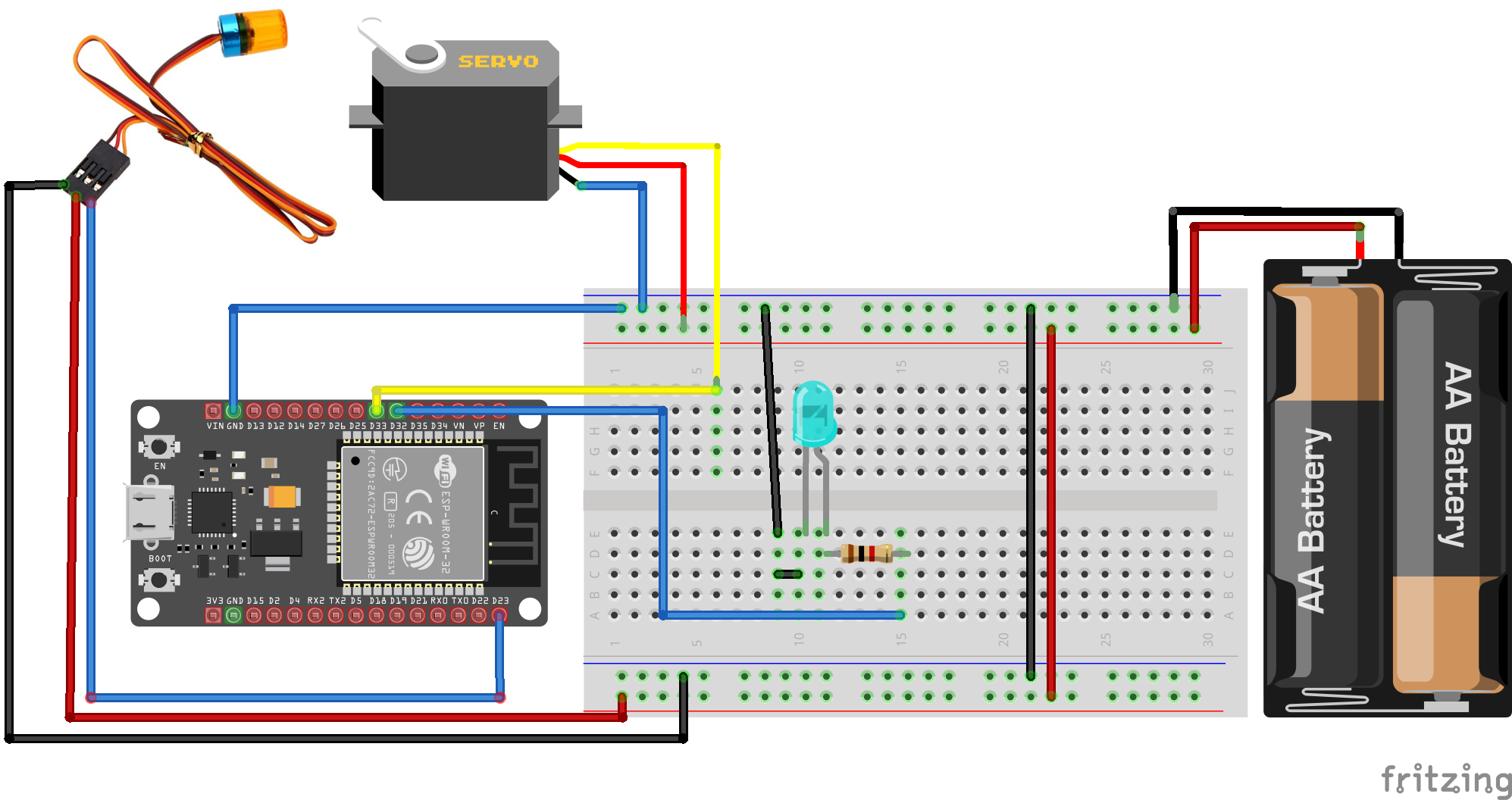
- ESP32 board (DOIT ESP32 DevkitV1) ×2
- LDR module ×1
- Flex (Bend) sensor ×1
- LED ×2
- 1kΩ resistance ×2 (for LED)
- 10kΩ resistance ×2 (for Flex Sensor)
- Servo motor (I used SG90)
- Battery ×1 (For motor) (If you don't have outlets in your bathroom, you need 2)
- Rotating light (GOOLRC AX-511R)
Others
- Your own toilet model.
(Don't worry, even if you cannot make this. You can still get notifications from Electron app in this repo.)
I made the model with clay and stainless wires but using a 3D printer would be much cooler and easier. Even if you don't have 3D printer, anything you can make 3D things will do.
How to start your application
-
Deploy Azure resources
-
Deploy resources you need on Azure Portal.
-
Deploy function codes.
You can deploy function codes by running following code in each function code directory Don't forget to build before uploading.npm run build && func azure functionapp publish $YOUR_FUNCTION_APP_NAME -
Set environment variables for
iot-hub-triggered functionon application settings in Azure Portal.
List of environment variablesDB_USER_NAMEDB_HOSTDB_PASSWORD
-
Set IoT Hub connection strings as
eventHubConnectionStringforiot-hub-triggered functionto bind Azure IoT Hub on application settings in Azure Portal. -
Set SignalR connection strings as
AzureSignalRConnectionStringfor both functions to bind SignalR on application settings in Azure Portal.
-
-
Assemble your IoT devices.
- Wire parts referring the diagrams above.
- Upload your Arduino sketch to each board. Don't forget to fill your IoT Hub connection info in
iot_configs.h. - Make your own toilet model (most fun and hard part).
- Attach the flex sensor to your toilet.
-
Run the Electron notification app on your local machine.
-
Fill your negotiator function URL before starting the app.
-
Start the app by running the following commands.
cd DesktopAlert
npm run start
-
-
Go to bathroom, leave without closing the lid, and turn off the light.
The system will let you know the lid is open by the rotating light and the desktop notification.